Artificial intelligence, robotics, PHP, Javascript, hacking, CSS, Photoshop, deep learning, machine learning, Visual basic

Thursday, 18 November 2021

TemplateDoesNotExit django error

 Django is a free and open-source web application framework written in Python. It is used for rapid web development and clean, pragmatic design. It is built by experienced developers to make web development tasks easier, so we can focus on writing apps instead of developing the backend server tasks.

While going through the development of a Django web app we go through the various commands such as django-admin startproject myproject, django-admin startapp my app, etc. After performing the basic command a folder with the name will be created in your workspace inside that you will find a manage.py file.


To check whether the Django app is been created or not pass the command in your terminal as python manage.py runserver.
After the command gets executed you will find that the server is running in your localhost at post 8000. You faced the TemplateDoesNotExit error that means you have done all the above commands.


As we have created a templates folder inside the myapp folder. now the structure inside myproject directory is smiler to:


├── myproject
│   ├── settings.py
│   ├── urls.py
│   └── wsgi.py
├── myapp
│   ├── admin.py
│   ├── apps.py
│   ├── models.py
│   ├── templates
│   │   └── your_app_name
│   │       └── my_index.html
│   ├── urls.py
│   └── views.py
├── manage.py
├── DB.sqlite3

Internal server error: TemplateDoesNotExit


TemplateDoesNotExit error occurs when the server call for the URL given by the developer to be redirected to a certain page and the render function doesn't get the template provided by the developer.


To solve this error first, go to your setting.py file which is inside of the /myproject/myproject/ folder, and add a few lines inside the setting.py file.

Steps to follow:


1. Add your app to INSTALLED_APPS.


INSTALLED_APPS = [
    ...
    'myapp',
    ...
]


2. Find this tuple inside the setiing.py.


TEMPLATES = [
        {
            'BACKEND': 'django.template.backends.django.DjangoTemplates',
            'DIRS': [],
            'APP_DIRS': True,
            'OPTIONS': {
                'context_processors': [
                    'django.template.context_processors.debug',
                    'django.template.context_processors.request',
                    'django.contrib.auth.context_processors.auth',
                    'django.contrib.messages.context_processors.messages',
                ],
            },
        },
    ]


3. Create a variable name TEMP_DIR


you will find a variable named as BASE_DIR = os.path.dirname(os.path.dirname(os.path.abspath(__file__)))
Now, create a variable with name TEMP_NAME = os.path.join(BASE_DIR,'myapp/templates') 


On the above TEMP_DIR change the 'myapp/templates' to your template name if it is in your app folder change 'myapp' as your app-name '/' name of the template. If the file structure is in the below form then just in place of 'myapp/templates'  put your template folder name as 'templates'.


├── myproject
│   ├── settings.py
│   ├── urls.py
│   └── wsgi.py
├── myapp
│   ├── admin.py
│   ├── apps.py
│   ├── models.py
│   ├── urls.py
│   └── views.py
├── templates
│   │   └── your_app_name
│   │       └── my_index.html
├── manage.py
├── db.sqlite3


4. Add the TEMP_DIR in the TEMPLATES tuple.


At first, your TEMPLATES tuple was as bellow:
TEMPLATES = [
        {
            'BACKEND': 'django.template.backends.django.DjangoTemplates',
            'DIRS': [],
            'APP_DIRS': True,
            'OPTIONS': {
                'context_processors': [
                    'django.template.context_processors.debug',
                    'django.template.context_processors.request',
                    'django.contrib.auth.context_processors.auth',
                    'django.contrib.messages.context_processors.messages',
                ],
            },
        },
    ]


In the 'DIRs':[], add your TEMP_DIR


After the change the tuple will be as follow:
TEMPLATES = [
        {
            'BACKEND': 'django.template.backends.django.DjangoTemplates',
            'DIRS': [TEMP_DIR],
            'APP_DIRS': True,
            'OPTIONS': {
                'context_processors': [
                    'django.template.context_processors.debug',
                    'django.template.context_processors.request',
                    'django.contrib.auth.context_processors.auth',
                    'django.contrib.messages.context_processors.messages',
                ],
            },
        },
    ]

5. Now run the python manage.py runserver to check whether the problem is resolved or not.

As you have specified the right template folder path. you will not find this error again. 

Conclusion: TemplateDoesNotExit error occurs when the render function inside the views.py file doesn't get the proper path of the template folder to find the template HTML file.
Share:

Tuesday, 16 November 2021

What is SEO and Keywords


What is SEO?

Let see what is SEO stands for. In simple words, we can say that SEO is a well-known practice or can say technique that is been used by the web developer and the website owners to rank their websites in a search engine like Google, Yahoo, and Bing, etc.

SEO stands for Search engine optimization. It's a processing to give an upper hand on other websites that let the website be on the top of other websites that provide the same service by providing an appropriate knowledge of your website content by using the keywords and my more attributes. 

Where is Seo used?

In now's, digital world everything is easily available on the internet. As we search any query over the search engine you can find that multiple search results appear that give the same kind of services but all have their presentation of contents. So to make a website reach a potential user search engines required helps from the website as it will take time to so go through the content and provide the right one. That's where crawling comes in, the search engine provides bots or you can say spiders that go through these meta tags that are been provided in a website. These tags provide a signal to the search engine what kind of data is been provided over the website and help the search engine to let the website be available to the right user.

when we perform a correct SEO technique or stride to the website then it helps to reach more and more traffic. As the traffic increases the number of sales of service and probability of getting more clicks to ads increases. so we can say that in sort that SEO is the most important practice that helps to make the website reach more and more people who are in search of that data.


What are Keywords?

Keywords are ideas and topics that define what kind of content does your website provides. In terms of SEO, they're the words and phrases that are been searched into search engines, also called "search queries." 

Why are keywords important?

Keywords are important because they are the anchor between what people are searching for and the content your website provides to fill their needs. Your goal is to rank on search engines and to drive organic traffic to your site from the search engine result pages (SERPs), and the keywords you choose to target will determine what kind of traffic you get. 

What are long-tail keywords?

Keywords can be broad and far-reaching (these are usually known as "head keywords"), or they can be a more specific combination of several terms, these are often called "long-tail keywords." 

keywords on your page

Creating compelling content is about providing real value for real people, not just sending hints to our robot friends at Google.

There are some basic keyword usage rules you should follow to get started. Unique keywords should be provided on each page of your site in the areas that bots and humans normally look to reassure them that you have what they're after. This includes both the title tag and the body of your content, which leads to an important point: the pitfalls of clickbait. You may believe you're enticing more clicks by offering tantalizingly vague titles for your content, but by disguising what the page is about, you're opting out of some of the power of keywords.

Share:

Monday, 15 November 2021

Top 6 SEO tools

 SEO is one of the most common terms you will hear when you will enter a web development field. As you are searching for SEO tools it is assumed that you have a common idea about what does SEO means. 

Still, for a kind of introduction to SEO, I will provide it to you.

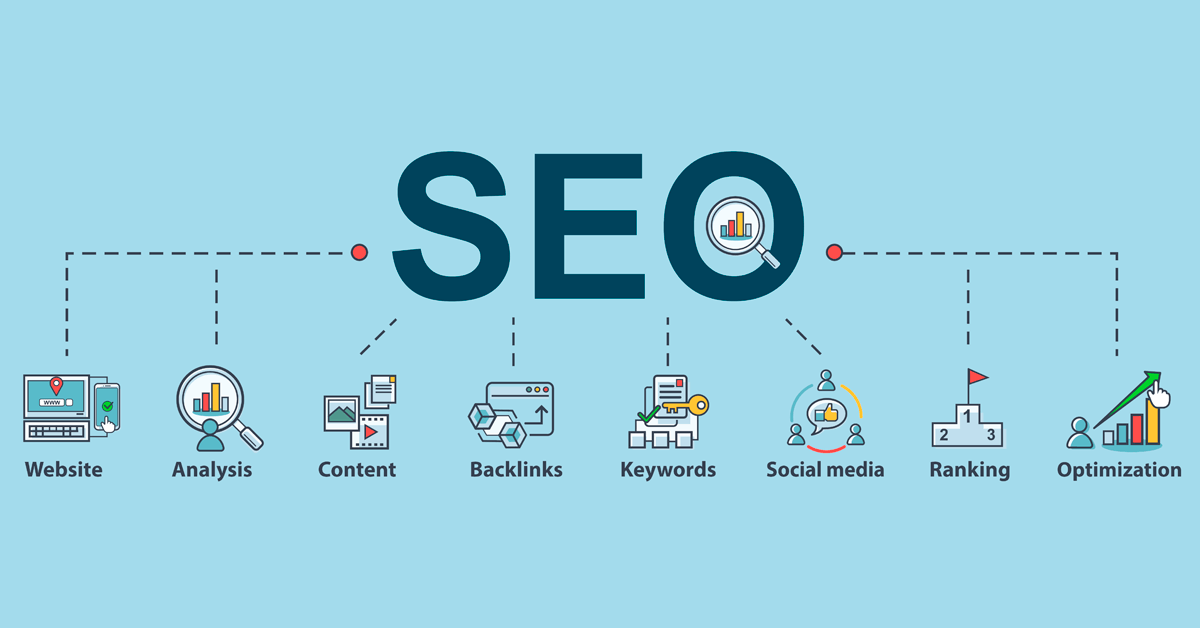
SEO-BitGeekTalks

In simple words, SEO is a technique used by a website developer or a website owner to rank their website over the search engine using various methods and tools.

Let see what are the various tools that are been used to improve the rank of a website to rank in search engines and get traffic over the website.

Now, we are gonna see 6 tools that are very good to perform SEO on a website and connect to a potential user of your customer by ranking them over the search engines.

6 Best SEO tools that are widely used by developers.

1.SEMrush

SEMrush is a most competitor analysis tool that helps users evaluate their competitors as well as their content. It provides robust metrics and allows users to get top-performing pages, content, and keywords.

SEMrush - BitGeekTalks

SEMrush has been successfully helping many website developers and many eCommerce entrepreneurs to understand the SEO strategies of their competitors and provide the right SEO technique to rank their website on search engines. This makes it one of the most popular SEO tools among small and medium-sized enterprises.


2. Google Search Console

Google search console is a free service provided by Google to a website developer and website owner, Google Search Console helps you to monitor and report on your website’s presence in Google SERP(Search Engine Results Page). All you need to do is verify your website by adding a google code on your website or going through Google Analytics and you can submit your sitemap for indexing and you are ready to analyze your website. Although it isn't necessary to have a Search Console account to appear in Google’s search results. As an SEO checker tool, Google Search Console can help you understand how Google and its users view your website and allow you to optimize for better performance in Google search results.

Google search console - BitGeekTalks


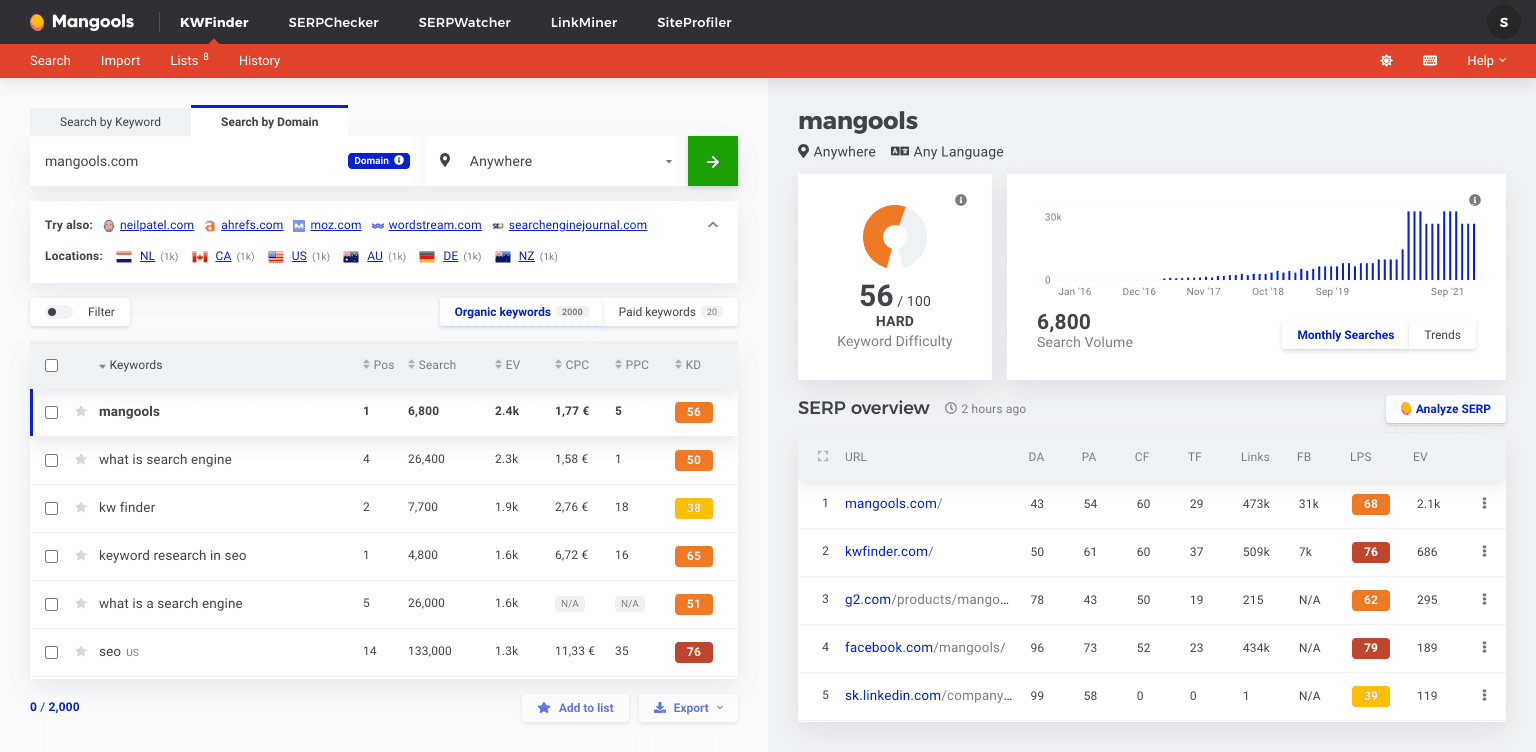
3.KWFinder

KWFinder is an SEO tool that helps you find long-tail keywords that have a lower level of competition. The experts use this SEO tool to find the best keywords and run analysis reports on backlinks and SERP (Search Engine Results Page). KWFinder Rank Tracker tool helps you easily determine your ranking while tracking your improvement based on one key metric. Plus, if that’s not enough, you’ll get lots of new keyword ideas and terms that help you to rank your website even higher in a search engine console.

KWFinder - BitGeekTalks

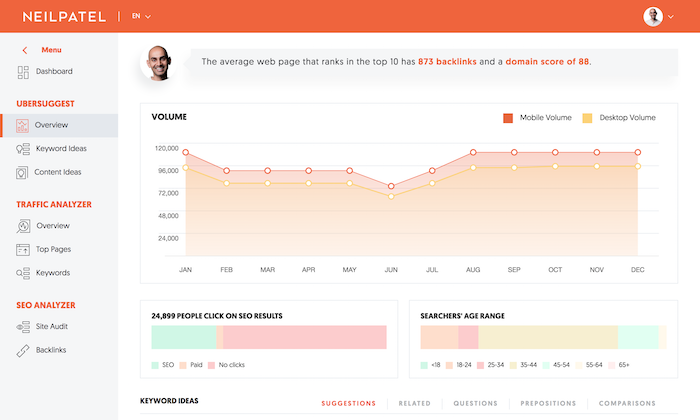
4. Ubersuggest

Ubersuggest is a free keyword finder tool that helps you identify keywords and also the search intent behind them by showing the top ranking SERPs From short to long terms phrases, In Ubersuggest you can find the right terms to use on your website with hundreds of suggestions. Ubersuggest is great for both organic SEO and paid PPC, this tool can help you determine if a keyword is worth targeting and how competitive it is. 

Ubersuggest -BitGeekTalks

5. SEOptimer

SEOptimer is an easy-to-use and straightforward SEO audit tool that helps you improve your page ranking. It excellently performs on-page optimization and off-page link building. You can get your website branded reports by running a check of multiple factors. SEOptimer also uses site crawling which detects various technical SEO problems by scanning every page of the website.

SEOptimer-BitGeekTalks

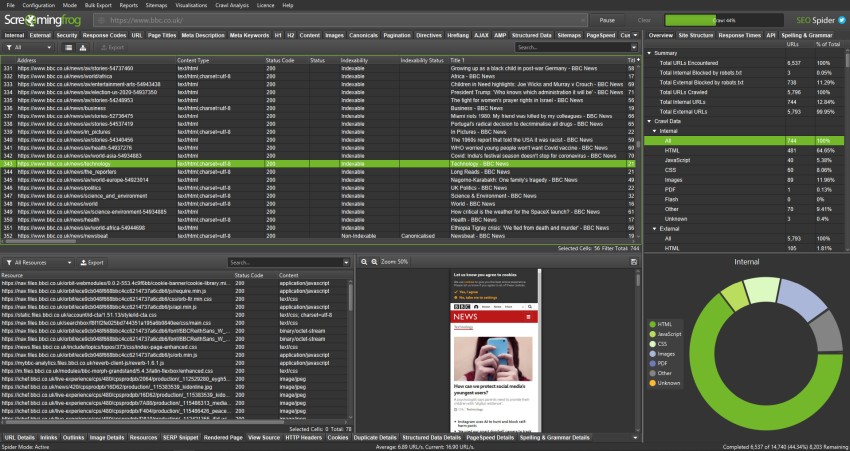
6. Screaming Frog

Screaming Frog is one of the best SEO Tools that help you perform super fast website audits. You just have to enter the URL of your website, and it will start crawling to find any broken links, missing tags, duplicate content, and so forth. Hardly any error goes unnoticed by Screaming Frog.

screaming frog is awesome in identifying both temporary and permanent redirect chains. One of the best this of screaming frog is that it Properly analyze your metadata and page titles to make sure they have an appropriate length.

Screaming Frog - BitGeekTalks

Share:

Saturday, 13 November 2021

Backlinks and how to create backlinks

 SEO is one of the most used practices performed by the website developer to rank their website over the search engines. While learning SEO you will come across a work "Backlinks". You must be wondering what do we mean by Backlinks and why does it so important for SEO or ranking a website over the search engines. So Let try to know what does backlinks mean and why is it used.

What is a Backlink?

In today's digital world data is gold and these data are been abstracted from the other websites to provide a user the content they are searching for. IN the field of websites backlinks are kind of strings that joins websites to each other.

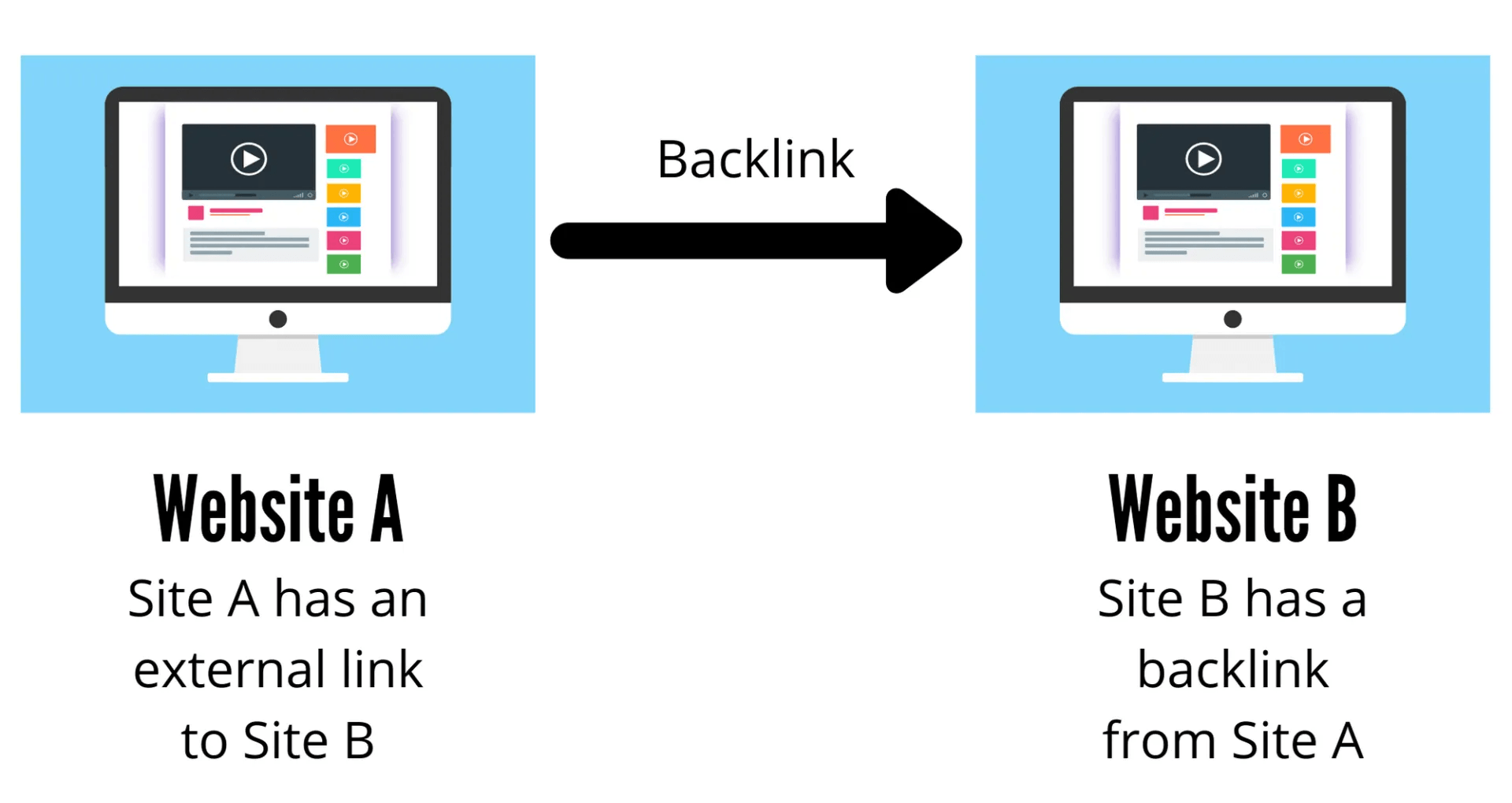
In simple words, we can say that Backlinks are created when one website is linked to another website.

Backlinks-BitGeekTalks

Let's understand it with an example, suppose you have a website A that provides educational stuff to your visitors. Now you have created a blog that gave a most brilliant explanation about the topic to make it more convincing, you will provide the resource from where you have learned about the topic by linking website B, which also gives information related to that topic. Now we can see that website B is linked to website A through a link and this link is only known as Backlinks.

Backlinks are Also known as “inbound” or “incoming” links.


Why Are Backlinks Important?

Backlinks are important for SEO as they provide a signal to Google that another resource finds your content valuable enough to link to it within their content. As a website earns additional backlinks, search engines infer that the website possesses valuable content worth ranking over the search engines.

How to build backlinks?

Conceptually, most link building tactics and strategies fall into one of the following four buckets: 

  1. Add. Manually add links to websites.
  2. Ask. Reach out to website owners directly to ask for a link.
  3. Buy. Exchange money for links.
  4. Earn. Get organic links from people who visited your page.

How to Get Backlinks

Here are 5 quick and simple tips for how to get backlinks...

  • Top Referral Sources

You can start by looking at the top referral sources of your website. These are websites that are linking to your content and offering you a backlink.

By finding out which type of websites link back to your site and the type of content they prefer, you can find new opportunities and create similar content to get a backlink.

  •  Use Outbound Links

 If you’re linking to a high authority website and sending a lot of traffic, you can send out an outreach email and form a collaboration.

Unfortunately, Google Analytics doesn’t provide an outbound links report out of the box. 

  • Google Search Console Reports

Google Search Console can also help you find opportunities for backlinks for your website. Google search console provides amazing data that can help to boost your website rankings.

Check your Top linking sites report. These are websites that linked back to your site in the past. You can go through the backlinks and see what type of content they provide and give you a backlink.

  • Broken Links

The broken link-building strategy is another quick and easy way of capturing backlinks.

Broken links are links that no longer exist or work on a website. And they may be caused by the source website removing those links (also known as 404 error), having an improper URL, or the destination website might have closed or moved to another domain.

  • High-Quality Content

One of the most basic ways of getting backlinks is by creating top-notch content. Your goal should be to create a piece of content that other bloggers and industry experts can use and link back to your site.


Are All Backlinks Valuable?

While backlinks are generally helpful to provide a trusted signal to the google that the content is convincing. On a website, not all backlinks are as valuable as others. Some are inherently more advantageous to earn others should be avoided whenever possible. Understanding the influencers of backlink value is crucial for link building and evaluating the health of your backlink profile

Share:

What is SEO and why Seo is that important

 While you are here it means you have heard about SEO, search engine optimizing, or the ranking of the website over the internet. SEO is one of the most important digital marketing and website ranking in search engines. You may have heard about it but not have a clear view about SEO and how does it work to rank our site in the search engines. As you have arrived at our blogging station so now it's our duty to give you a good understanding of SEO(Search Engine Optimising).

First of all, let me give you a small introduction to SEO

What is SEO? When was it introduced?

Website is one of the most widely use technics to introduce yourself or your business to this digital world. As we spend most of our time over the internet to search for our answers or services that fulfill our requirements. According to Google in a day billions of google searches are been done and we are aware that there are lots of websites that have the same kind of answers and services for our requirements. To show the most accurate and useful data to the user. 

SEO is a well-known practice that are been added to a website to make Google know more about our services and know what does your website provides for a user. In simple words, we can say that SEO is a technics or practice that helps A website to rank in Google by providing the important information about the kind of data that the website is providing to a user by using meta tags that contain keywords and much more information about the content in that website. SEO was introduced in 1991, Around this time, the world’s first website was launched, and one quickly turned into many as websites crowded the internet. So, there was a huge need for structure and accessibility, and the world’s first search engines were created. 

In 1993, Excite revolutionized how information was categorized, and in 1994, Alta Vista, Yahoo, and others joined the scene, and in 1996, SEO really took off when BackRub was introduced to people. In 1997 Google register the domain and Backrub become Google.

Why is SEO Important?

Rankings

While searching for a service or product over the internet, users are more likely to choose one of the top ten suggestions that the search engine provides regarding a query of the user. SEO helps you rank higher in search results and gain more traffic, making potential customers more likely to click over to your site. 

Website Traffic

When potential customers can’t find your website or the services that you provide, the sales opportunities are being missed. SEO increases your organic search engine traffic and keeps increasing the number of visitors to your website every day. This directly correlates to an increase in traffics – because the more relevant people that see your site, the more likely your site will get popularity.

User Experience

A well-optimized website clearly communicates what product or service is being offered, how to obtain it, and answers any questions surrounding it. By optimizing the site build to the user’s experience, search engines like Google and Bing are able to easily pull the information relevant for the user. If a user struggles to navigate your site, chances are that search engines do as well.

Growth

There’s no doubt about it – SEO is key to the growth of your website and brand. As we mentioned above, the higher you rank on a search engine for a variety of high-volume keywords, the more organic web traffic your site will receive. It’s as simple as that. A website that is well-optimized is more likely to gain more visitors. 


Things to keep in mind to optimize your website.

Keywords

Keywords are no longer the only SEO technique, But it still is crucial for your website to rank in a search engine. When we speak of keywords, we are referring to specific words and phrases that provide an idea about the data available on the website.

Picking the right keywords for your website and content takes diligent research, and it’s important to aim for high potential traffic.

Content

The topic on which you choose to write and share on your website is essential to reaching and engaging with your audience. when a local user searches a question or a query over the search engines, Your blog shows up. This allows you to start a conversation with a potential customer by providing them with valuable information that they are actively searching for

On-site SEO

On-site SEO is the technique to be applied to the content on your site to ensure that it’s search engine friendly. When optimizing your web pages for search engines, You want to provide information to search engines exactly what the webpage is about.

Local SEO

If you own a local business that only serves a local area, your website is not ranking in other cities. Search engines pull the user’s location to make suggestions that are within a certain range so that they can make a quick decision rather than sort through businesses that are nowhere near at that point in time.

Off-site SEO

Off-site search engine optimization techniques involve activities or links made on websites outside of your own to push your own website to rank higher. The key element to off-site SEO is link building or you can say “backlinks,” which is an effort to have other reputable, high-traffic websites link back to your site.

Backlinks are a trusted signal to search engines and they can play a huge part in website ranking. Ensure that the links are coming from well-known and trusted sites and your ranking will be positively affected.

Share:

Copyright © Technotalk | Powered by Academy for brilliance